If you have spent years mastering CRM Analytics — building intricate Recipe logic, joining datasets across org boundaries, crafting SAQL that your colleagues cannot decipher without a coffee — you have probably looked at Data 360 (formerly Data Cloud, rebranded October 2025) and felt one of two things: either mild anxiety about learning an entirely new platform, or quiet confidence that it probably works the same way.
Both instincts are partially right. And that is exactly what makes Data 360 so interesting to navigate right now. Here are the five things that genuinely matter when bridging the two platforms — and the one that will trip you up mid-project if you are not watching for it.
Your Recipe Builder skills already make you a Data 360 candidate
The mechanism for processing data at scale in Data 360 is called a Batch Data Transform (BDT). When you first open the BDT interface, the recognition is immediate — the nodes, the visual flow, the point-and-click logic. It is not just similar to Recipe Builder. It is functionally the same experience dressed for a different context.
“It is quite similar to the UI of a Recipe Builder or recipe data prep in CRM Analytics.”
Why does this matter? Because the single biggest barrier to adoption for most CRMA practitioners is the assumption that Data 360 requires starting over. It does not. Your existing mental model for how data transformation works translates almost directly. The investment you have already made in Recipe Builder is not legacy knowledge — it is your head start.
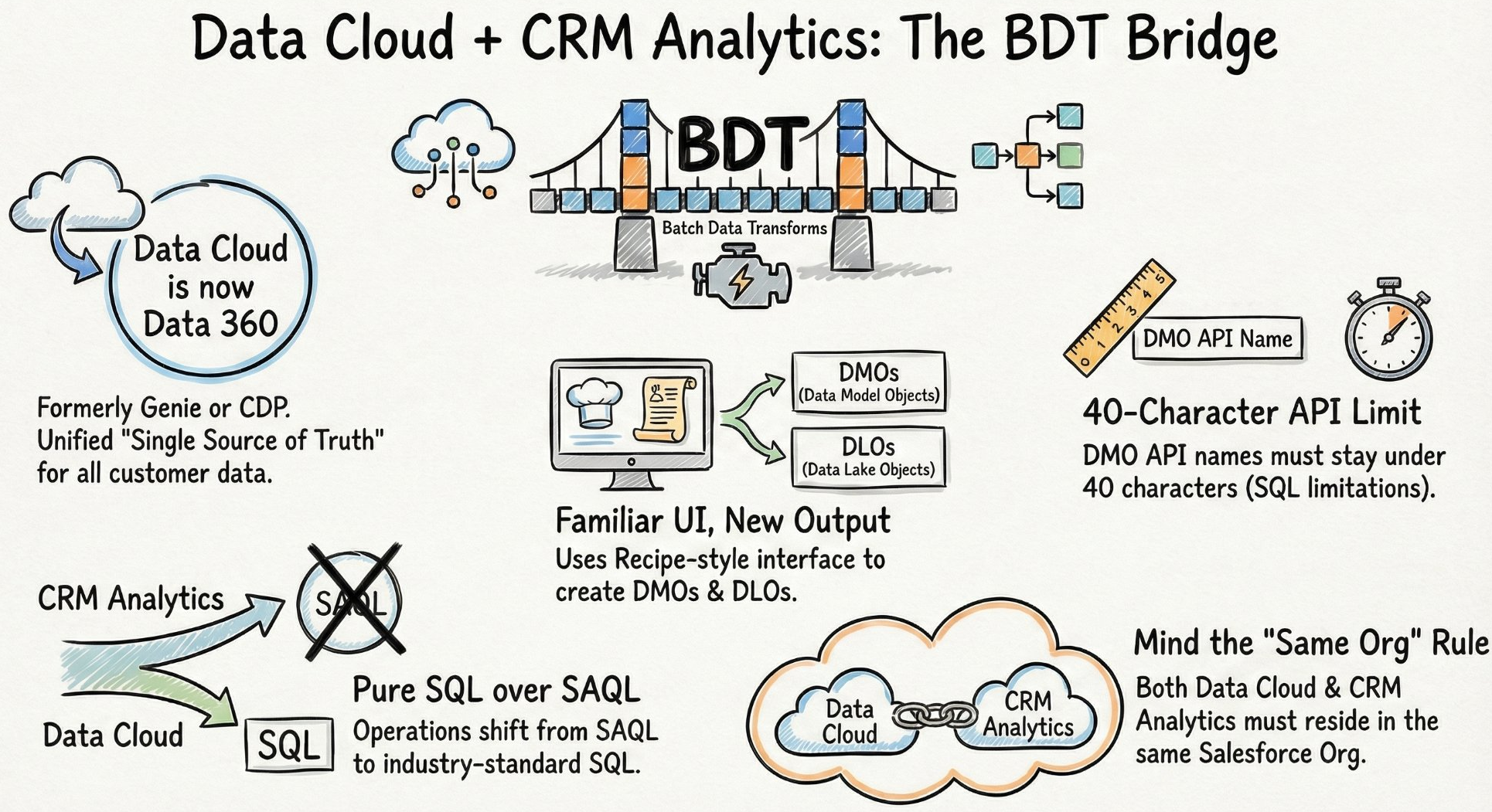
The BDT Bridge — how Data 360 connects to CRM Analytics through Batch Data Transforms, and the five constraints every architect needs to internalise before they start.
The Two-Node Rule: you cannot do complex work in the same BDT that writes to Data 360
This is the one that catches consultants mid-project. A BDT recipe that writes output to Data 360 can only contain two nodes — one input, one output. No joins, no aggregations, no complex transformations in the same recipe that pushes to the Data 360 target.
What this means in practice is that you adopt a Two-Recipe Chain. Do all your heavy lifting in a standard CRM Analytics recipe first — all your joins, filters, calculated fields, aggregations. Then use a second, clean BDT recipe purely to push that prepared result into Data 360. Two recipes. Two jobs. Zero exceptions.
Raw datasets
Joins • Filters • Aggregates
Clean dataset
Input → Output only
DMO target
Once you accept the Two-Recipe Chain as the standard pattern, the constraint stops feeling like a restriction and starts feeling like a clean separation of concerns. Transformation logic lives in one place. Data movement lives in another. That is actually good architecture.
DLOs and DMOs are not the same thing — and confusing them is expensive
Data 360 distinguishes between two types of objects that look similar on the surface but serve fundamentally different purposes in the architecture.
A Data Lake Object (DLO) is raw storage. Data lands here exactly as it exists in the source system — no transformation, no normalisation, no opinions about structure. A Data Model Object (DMO) is the standardised, unified layer. Think of these as SQL views (though custom BDT-generated DMOs behave more like tables). They are often prefixed with ssot (Single Source of Truth).
The secret is normalisation through DMOs. You might have a “Contact” in one Salesforce org and an “Individual” in another. By mapping both to a standard ssot DMO structure, you resolve the complexity of varying field names and source-system conventions — producing a single harmonised view that the rest of the platform can trust regardless of origin.
SAQL is out. Pure SQL is in — and that is a bigger deal than it sounds
One of the most significant shifts when moving from CRM Analytics datasets to Data 360 DMOs is the query language. CRM Analytics dashboards rely on SAQL — Salesforce’s proprietary Analytics Query Language. Data 360 DMOs run on pure SQL. When you query a DMO in a dashboard, the backend is executing standard SQL.
For advanced analysts, this means learning SQL Bindings — a new syntax for dynamic filtering that replaces the SAQL binding patterns you may have spent years perfecting. The three identifiers to know:
asSQLwhere   ← dynamic WHERE clause filtering
asSQLhaving  ← post-aggregation filters (HAVING clause)
asSQLgroup   ← dynamic GROUP BY grouping
The move to SQL is deliberate. Salesforce is aligning with the global industry standard, opening the platform to a vast pool of developers and analysts who are already SQL-fluent but have never touched SAQL. For existing CRMA practitioners, the transition requires unlearning some deeply ingrained syntax patterns. For organisations hiring analytics talent, it is a significant unlock.
The constraints are specific, non-negotiable, and will surface at the worst possible moment
Every platform has fine print. Data 360’s fine print is particularly important to know before you start, because several of these constraints only surface when you are deep into an implementation — at exactly the point where changing course is most painful.
None of these constraints make Data 360 the wrong choice. They make it a platform that rewards preparation and punishes improvisation. The consultants who succeed here walk in already knowing the fine print.
The Agentic future runs on the foundation you build today
Transitioning from CRM Analytics recipes to Data 360 transforms your role from report builder to data architect. But the reason the timing matters is not just platform modernisation — it is what comes next.
AI Agents are only as good as the data they consume. In a siloed environment, an Agent might encounter a “Lead” in one system and a “Contact” in another and treat them as two different people — leading to hallucinations, redundant actions, and eroded trust in the outputs. A properly built Data 360 foundation, with unified DMOs creating a Single Source of Truth, gives Agents the reliable, 360-degree view they need to perform autonomous tasks without fabricating context.
The work you do now to normalise your data architecture is not just technical hygiene. It is the infrastructure for the next generation of how your organisation makes decisions.
“You are going to use Data Cloud in some way or another in the upcoming future — get yourself certified for the same.”
If your data is the fuel for the next generation of AI Agents — is your current foundation solid enough to power them, or is your best logic still trapped in a silo?